All organizations can set up their own branding by adding an organization logo, setting a unique site where their students can login, and setting the colors of the branding site.
Upload Logo
An organization logo that is 200x200px can be uploaded. The formats that are allowed are jpg, png, gif, webP.

Custom Site
Setting the subdomain will allow the students to login at the site you have set. Parents that the organization has created can also login to the site.
Note: If parents connect to the organization through the Access code, they will still login to https://homeschoolhub.com.
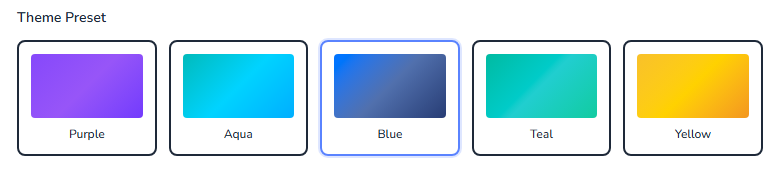
Theme Preset
Themes allow the organization to set the color scheme of the site. Default themes are available for the Class Connect site, and additional customizations are available.
Color Settings
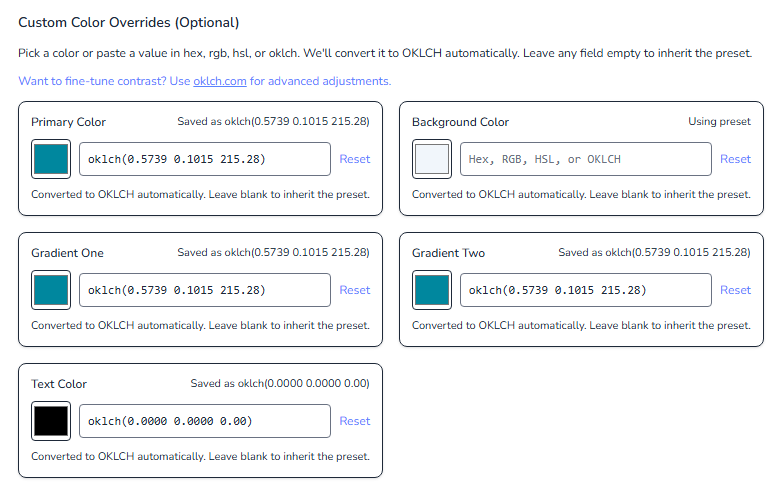
RGB, Hex, and OKLCH are accepted. The color overrides will automatically convert RGB and Hex to OKLCH.
Primary Color – Buttons, links, and toggles
Background Color – typical color should be white
Default - Red: 241 Green: 246 Blue: 251
Gradient #1 and #2 – Left side main menu and login page
Text Color – typical color should be black
Default – Red: 52 Green: 58 Blue: 64
Once all settings have been added, click Save Branding Settings at the bottom of the page.

White-Label Tab
White-Label branding allows the organization to further enhance their custom site experience. All are optional to set.
Page Title – Controls the name that appears in the top of the browser tab.
SEO Description – Helps with search results of the site.
App Icons – The Favicon and App Icons controls the icon that is in the browser tab and when it gets saved as a shortcut or app on the desktop
Social Sharing – Sets the theme for how the link appears when the site is shared via social media.
PWA Colors – When the site is added on a mobile device to the home screen like an app, these settings control the colors of how it will open.